- Zero-Trust
- FastAPI
- React
- Machine Learning
- Python
ZT Suite
An end-to-end zero-trust demonstration combining endpoint posture verification, MFA access gates, CICFlowMeter runtime pipelines, and ML flow anomaly detection.
The traditional castle-and-moat security model assumes that anything inside the office firewall is trustworthy. This means a single infected developer laptop or a stolen password grants attackers free rein to pivot across internal subnets.
Enterprise Zero-Trust architectures solve this by enforcing continuous verification. But they usually need huge IT budgets, Mobile Device Management (MDM) rollouts, and specialized appliances that SMEs cannot operate.
ZT Suite is a simple, end-to-end demonstration of a Zero-Trust security platform. It unifies identity verification, real-time endpoint device auditing, packet capture, and machine learning network intrusion detection into a cohesive, four-gate defense architecture.
graph TD
  Browser[Web Browser]
  Agent[Endpoint Agent]
  Backend[FastAPI Backend]
  DB[(SQLite Database)]
  Resource[Protected Files]

  Agent -->|Posture & Scored Flows| Backend
  Browser -->|Probe Identity| Agent
  Browser -->|Access Request + Device ID| Backend
  Backend -->|Validate Session & State| DB
  Backend -->|Authorize File Preview| Resource
1. The Four-Gate Access Control Chain
Most internal web portals grant access the moment a user enters valid credentials. If an employee logs in from a malware-ridden personal laptop with disabled firewalls, the server serves confidential files without hesitation.
ZT Suite improves session cookies with a strict four-gate verification chain enforced on every sensitive API request. Access is rejected unless all four conditions evaluate to true simultaneously:
- Identity Gate: The user presents a valid JWT access token stored in browser memory.
- MFA Gate: The account has active OTP multi-factor authentication enrolled.
- Ownership Gate: The hardware identifier passed in the request belongs to the authenticated user.
- Posture Gate: The physical device has a compliance score of at least 70% from recent telemetry probes.
graph LR
  Req[Client Request] --> G1{Valid Token?}
  G1 -- Yes --> G2{MFA Enabled?}
  G1 -- No --> Deny[401 / 403 Forbidden]
  G2 -- Yes --> G3{User Owns Device?}
  G2 -- No --> Deny
  G3 -- Yes --> G4{Score >= 70%?}
  G3 -- No --> Deny
  G4 -- Yes --> Allow[Resource Access Granted]
  G4 -- No --> Deny
In FastAPI, this pipeline is enforced through nested dependency injection. The route handler never receives execution control unless each dependency passes:
@router.get("/files")
async def get_protected_files(
    db: DbSession,
    current_user: User = Depends(require_mfa),
    device: Device = Depends(get_compliant_device),
    _: User = Depends(require_roles(RoleName.ADMIN, RoleName.USER)),
) -> dict[str, object]:
    access_log_service.log_access(
        db=db,
        action="resource_access_granted",
        status="success",
        user_id=current_user.id,
        resource="/api/protected/files",
        details=f"Device: {device.hostname}, ID: {device.id}",
    )
    return {
        "message": "Access Granted",
        "user": current_user.email,
        "device": device.hostname,
        "files": _public_file_metadata(),
    }
The get_compliant_device dependency inspects the incoming X-Device-ID header, verifies foreign ownership against the authenticated user, and checks device.is_compliant:
async def get_compliant_device(
db: DbSession,
current_user: CurrentUser,
x_device_id: int | None = Header(default=None, alias="X-Device-ID"),
) -> Device:
if not x_device_id:
raise HTTPException(status_code=400, detail="X-Device-ID header missing")
device = db.get(Device, x_device_id)
if not device:
raise HTTPException(status_code=404, detail="Device not found")
is_admin = any(r.name == "admin" for r in current_user.roles)
if device.user_id != current_user.id and not is_admin:
raise HTTPException(status_code=403, detail="Device does not belong to user")
if not device.is_compliant:
raise HTTPException(status_code=403, detail="Device is not compliant")
return device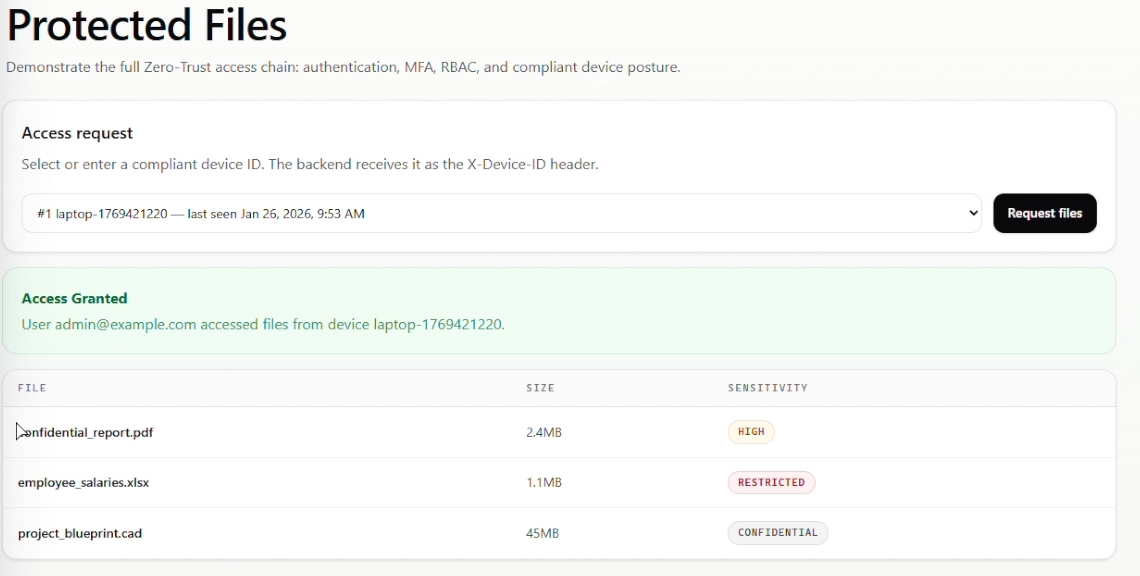 Protected Files console granting access after verifying identity, MFA, and compliant device posture.
2. The Browser-to-Agent Loopback Bridge
In a deployed Zero-Trust architecture, the backend server is remote, but access decisions must verify the physical machine sitting in front of the employee.
Because web browsers run in an isolated sandbox, client-side JavaScript cannot read the local host’s hardware UUID, BitLocker encryption status, or running processes.
To bridge this gap without relying on easily spoofed dropdown menus or NAT-masked IP addresses, the endpoint agent runs a lightweight loopback server on the employee’s workstation (127.0.0.1:8756).
sequenceDiagram
  participant Browser as Browser Client
  participant Agent as Local Agent (127.0.0.1:8756)
  participant API as Central API Gateway

  Browser->>Agent: GET http://127.0.0.1:8756/identity
  Agent-->>Browser: Agent & Device ID
  Browser->>API: GET /api/protected/files (Header: X-Device-ID)
  API->>API: Check Posture & Ownership in DB
  API-->>Browser: 200 OK (Render Decrypted Content)
The endpoint agent runs a lightweight HTTP daemon bound strictly to localhost:
class LocalIdentityServer:
    def start(self) -> None:
        handler = _build_handler(self._logger)
        self._server = ThreadingHTTPServer(
            (settings.local_identity_host, settings.local_identity_port),
            handler,
        )
        self._thread = Thread(target=self._server.serve_forever, daemon=True)
        self._thread.start()
When a user opens the protected document UI, the frontend issues a silent pre-flight probe to http://127.0.0.1:8756/identity:
export const localAgentService = {
  async getIdentity(): Promise<LocalAgentIdentity> {
    const response = await fetch("http://127.0.0.1:8756/identity", {
      cache: "no-store",
    });

    if (!response.ok) {
      throw new Error("Local ZT Agent identity endpoint is unavailable");
    }

    return response.json() as Promise<LocalAgentIdentity>;
  },
};
If the agent is not installed and running on that specific physical device, the loopback request fails immediately, the header cannot be populated, and file access is denied. The device token cannot be forwarded to a rogue external machine because 127.0.0.1 stays local to the client’s network stack.
3. Cooperative Posture Collection Without MDM
Smaller companies cannot afford five-figure annual contracts for enterprise MDM suites like Microsoft Intune. ZT Suite uses a cooperative agent daemon running natively on endpoints to audit devices.
Instead of installing drivers, the agent queries standard operating system interfaces across Windows and Linux.
graph TD
  Agent[Posture Collector] --> OS{Platform Probe}
  OS -->|Windows| WMI[WMI & CIM cmdlets]
  OS -->|Windows| BDE[manage-bde]
  OS -->|Windows| COM[Update.Session COM]
  OS -->|Linux| UFW[ufw & firewall-cmd]
  OS -->|Linux| PROC[psutil ClamAV Daemon]
  OS -->|Linux| BLK[lsblk crypt / LUKS]
  OS -->|Linux| APT[apt-get upgrade simulation]
Windows Probes
- Antivirus Presence: Queries WMI SecurityCenter2 via PowerShell:
Get-CimInstance -Namespace root/SecurityCenter2 -ClassName AntiVirusProduct | Select-Object -ExpandProperty displayName - Firewall Health: Validates that all domain, public, and private firewall profiles are active:
(Get-NetFirewallProfile | Select-Object -ExpandProperty Enabled) -join ',' - Disk Encryption: Checks BitLocker volume status:
manage-bde -status - Patch Currency: Interrogates the Windows Update COM object without triggering a download:
$session = New-Object -ComObject Microsoft.Update.Session
$searcher = $session.CreateUpdateSearcher()
$result = $searcher.Search("IsInstalled=0 and Type='Software'")
$result.Updates.Count
Linux Probes
- Firewall: Checks active status across
ufworfirewall-cmd. - Antivirus: Inspects running process tables and binaries for ClamAV daemons (
clamd,freshclam,clamscan). - Disk Encryption: Scans the block hierarchy with
lsblk -o TYPE -nrto confirm root filesystems sit atopcrypt(LUKS) partitions. - Patch Status: Executes dry-run package audits (
apt list --upgradableorapt-get -s upgrade).
Dynamic Compliance Scoring
Endpoints are scored on a 100-point scale:
Score = round((Raw Points / Possible Points) * 100)- Antivirus Active: 40 points
- Firewall Enabled: 30 points
- Full-Disk Encryption: 20 points
- Operating System Up-to-Date: 10 points
If an OS can’t check updates, the maximum drops from 100 to 90 instead of failing. Scores ≥ 70 pass.
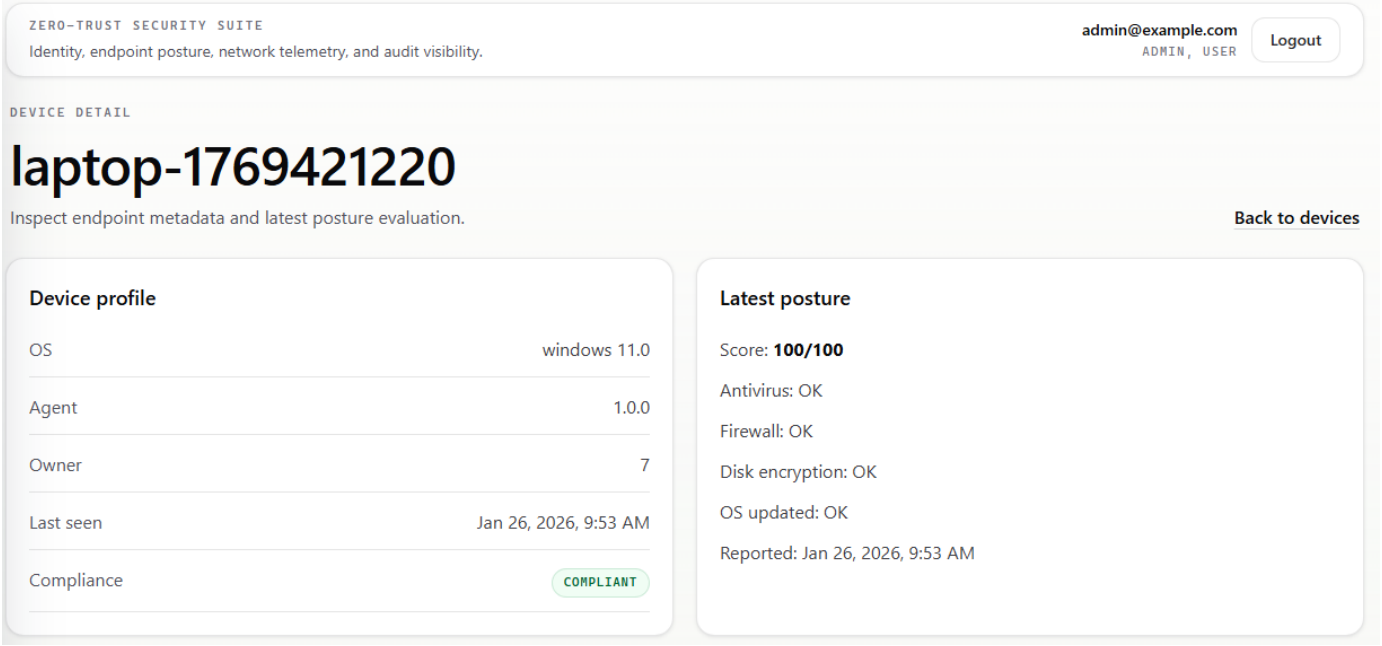 Device detail view displaying hardware profile and posture check breakdown (Antivirus, Firewall, BitLocker, OS updates).
4. Runtime Flow Generation with CICFlowMeter
Intrusion detection models are trained on CSE-CIC-IDS2018 flow data generated by CICFlowMeter, which computes 78 statistical dimensions per bidirectional flow (e.g. packet lengths, inter-arrival times, subflow statistics, TCP window sizes, active/idle periods).
To ensure the classifier receives the exact schema and statistical distributions it was trained on, the endpoint agent uses CICFlowMeter as its canonical runtime feature generator.
However, CICFlowMeter is designed as an offline research CLI, not an embedded agent daemon. Making it run reliably inside a background service required three adaptations:
- Windowed PCAP Rotation: The agent captures packets in bounded 60-second windows using Scapy and writes them to temporary
.pcapfiles, keeping capture and feature extraction decoupled. - Direct Python API Integration: The packaged
cicflowmeterCLI contains a bug where positional arguments are mispassed intocreate_sniffer. The agent bypasses the CLI and callsFlowSessionandAsyncSnifferdirectly with keyword arguments. - Explicit Thread Cleanup: CICFlowMeter leaves an internal garbage collection thread running after processing. The agent explicitly signals
session._gc_stopand joins the thread to avoid leaking worker threads on each 60-second window:
def pcap_to_flows(pcap_path: Path, csv_path: Path) -> pd.DataFrame:
    session = FlowSession(
        output_mode="csv",
        output=str(csv_path),
        fields=None,
        verbose=False,
    )
    sniffer = AsyncSniffer(
        offline=str(pcap_path),
        prn=session.process,
        store=False,
    )
    sniffer.start()
    sniffer.join(timeout=settings.cicflowmeter_timeout)
    if sniffer.running:
        sniffer.stop()
        raise CicFlowMeterError("CICFlowMeter timed out")

    if hasattr(session, "_gc_stop"):
        session._gc_stop.set()
        session._gc_thread.join(timeout=2.0)
    session.flush_flows()

    return pd.read_csv(csv_path)
The resulting CSV of network flows is then scored directly by the trained model.
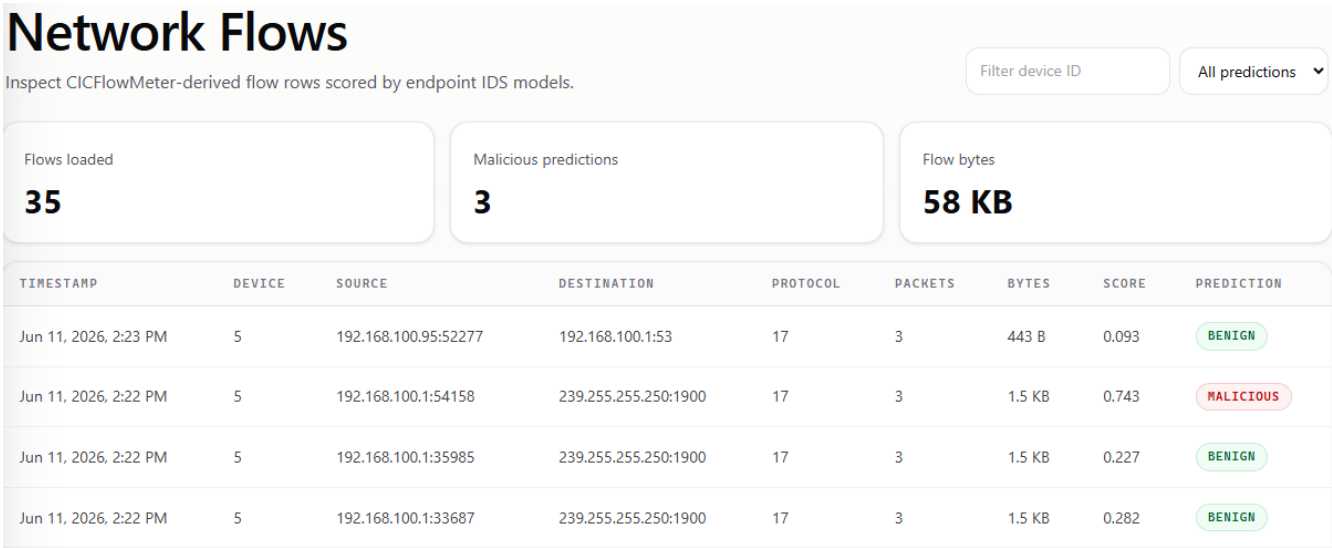 Network flows interface showing live CICFlowMeter features and model anomaly predictions.
5. Machine Learning Pipeline & Leakage Prevention
Intrusion detection models were trained across Random Forest, XGBoost, and Multi-Layer Perceptron (MLP) architectures using the 78 flow features. Multiple models can work together to provide second opinions or corroborate predictions.
Model Results
Evaluated on labeled flow data, Random Forest delivered the highest overall accuracy and lowest false-positive rate:
| Model | Accuracy | Malicious F1 | False Positives | False Negatives | True Positives |
|---|---|---|---|---|---|
| Random Forest | 94.68% | 0.7999 | 9,962 | 8,449 | 36,800 |
| XGBoost | 93.52% | 0.7715 | 15,088 | 7,355 | 37,894 |
| MLP | 92.33% | 0.7371 | 18,537 | 8,020 | 37,229 |
Building a sufficiently robust IDS pipeline required solving two widespread machine learning vulnerabilities:
Session-Based Splitting
Randomly sampling rows in network datasets causes data leakage: flows from the same TCP conversation end up in both training and testing sets, artificially inflating evaluation metrics.
To prevent this, train_test_split_session groups flows into pseudo-sessions using destination port, flow duration, and forward/backward packet counts before splitting:
def train_test_split_session(df: pd.DataFrame, test_size: float = 0.2):
    df["session_id"] = (
        df["Dst Port"].astype(str)
        + "_"
        + df["Flow Duration"].astype(str)
        + "_"
        + df["Tot Fwd Pkts"].astype(str)
        + "_"
        + df["Tot Bwd Pkts"].astype(str)
    )

    session_labels = (
        df.groupby("session_id")[LABEL_COLUMN].agg(lambda x: x.mode()[0]).reset_index()
    )

    train_sessions, test_sessions = train_test_split(
        session_labels["session_id"],
        test_size=test_size,
        stratify=session_labels[LABEL_COLUMN],
        random_state=42,
    )

    train_df = df[df["session_id"].isin(train_sessions)]
    test_df = df[df["session_id"].isin(test_sessions)]

    return (
        train_df[FEATURE_COLUMNS].to_numpy(),
        test_df[FEATURE_COLUMNS].to_numpy(),
        train_df[LABEL_COLUMN].to_numpy(),
        test_df[LABEL_COLUMN].to_numpy(),
    )
By ensuring that entire communication sessions reside exclusively in either the train or test partition, evaluation metrics reflect true generalization performance.
Feature Dominance Guardrail
To ensure tree models (XGBoost) do not over-rely on a single artifact (such as a specific destination port), the training pipeline validates feature importances after fitting. If any single feature accounts for >40% of tree importance, training halts:
def sanity_check_importance(df: pd.DataFrame) -> None:
    top_feature = df.iloc[0]
    if top_feature["importance_pct"] > 40:
        raise RuntimeError(
            f"Feature dominance detected: {top_feature['feature']} "
            f"accounts for {top_feature['importance_pct']:.2f}% of importance"
        )
6. Streaming Aggregation & Alert Suppression
Scoring flows individually produces too many alerts. An adversary running an Nmap service scan or brute-force campaign generates 5,000 flows in sixty seconds. If the IDS creates 5,000 separate alerts, the dashboard becomes unusable.
ZT Suite routes scored flows through an in-memory tumbling-window aggregation engine.
graph TD
  Flows[Scored Flows] --> Watermark[Event-Time Watermark Check]
  Watermark --> Window[60-Second Window Buckets]
  Window --> MultiGroup[Group: src_ip & src_ip + dst_port]
  MultiGroup --> Rules{Evaluation Rules}
  Rules --> R1[Campaign Ratio >= 20%]
  Rules --> R2[Fanout Ports >= 30]
  Rules --> R3[SYN Flood RST/SYN >= 0.6]
  R1 & R2 & R3 --> Hash[SHA-1 Dedup Hash]
  Hash --> Output[Actionable High-Confidence Alert]
Handling Delayed Packets (Watermarks)
Network packets frequently arrive out of order or get delayed in OS network buffers.
If the engine sealed its 60-second window (00:00 – 01:00) the instant the system clock hit 01:00, that delayed packet would be dropped or miscounted in the next minute, corrupting traffic metrics.
To fix this, the engine tracks the latest packet timestamp it has seen (the watermark) and waits for a 10-second grace period. The 00:00 – 01:00 window is not closed and scored until the engine observes traffic timestamped at 01:10 or later:
ws = _window_start(ts, self.cfg.window_secs)
we = ws + pd.Timedelta(seconds=self.cfg.window_secs)
if ts < (watermark - allowed) and we <= (watermark - allowed):
    return  # Drop flows arriving past the finalization cutoff
Aggregation Rules: Combining ML with Thresholds
The engine tracks rolling statistics per source IP and destination port:
- Campaign Anomaly Ratio (
campaign_ratio): Triggered when 20% of flows flagged anomalous across 50 flows:Ratio = Weak Anomaly Flows / Total Flows >= 0.20 - Port Fan-out (
fanout_ports): Flags an IP contacting 30 unique ports at 0.5 flows/sec for possible port scanning or DoS attack. - TCP Flag Instability (
syn_rst_instability): Catches SYN flood DoS attacks and connection resets when total SYN packets exceed 100 and the RST-to-SYN ratio exceeds 0.6:RST Count / max(SYN Count, 1) >= 0.6
Idempotent Alert Hashing
To prevent duplicate alerts across window flushes, each alert ID is a SHA-1 hash of its time window, IP, and triggered rules:
def _alert_id(window_start: pd.Timestamp, group_by: str, group_key: str, rule_ids: list[str]) -> str:
raw = f"{window_start.isoformat()}|{group_by}|{group_key}|{','.join(sorted(rule_ids))}".encode("utf-8")
return hashlib.sha1(raw).hexdigest()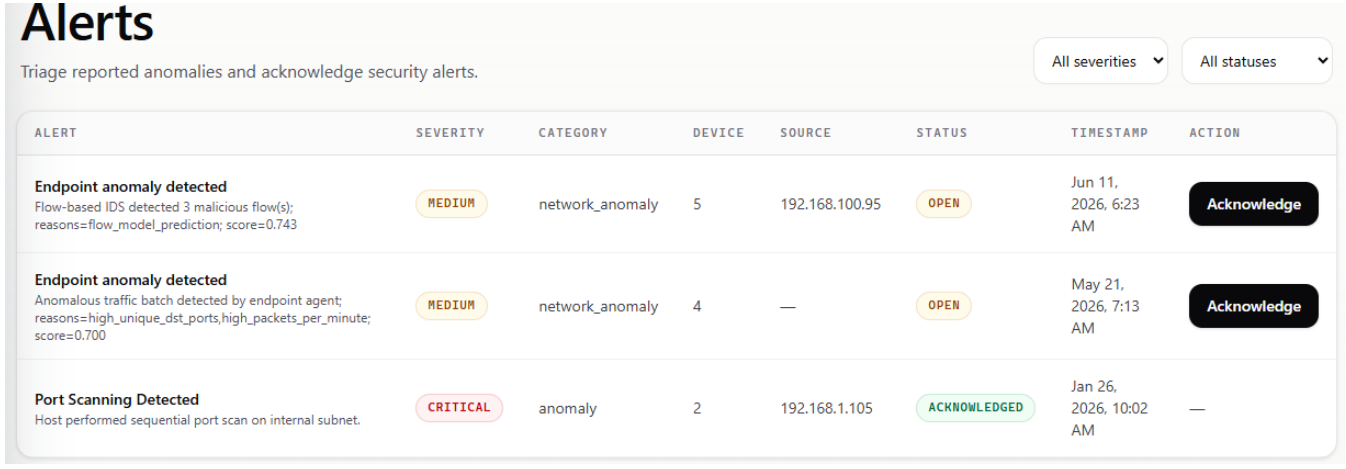 Alerts queue showing triage status, severity classification, and anomaly indicators.
7. Adversary Simulation in a Virtual Lab
To validate detection and enforcement under real attack conditions, the system was deployed across an isolated three-node testbed:
graph LR
  Kali[Attacker VM: Kali Linux] -->|Hydra, Nmap, Hping3| Ubuntu[Victim Server: Ubuntu 24.04<br/>Endpoint Agent]
  Ubuntu -->|Flows & Alerts| Host[Admin Console: Windows 11<br/>Control Plane]
Attack Scenarios Tested
- Credential Brute-Forcing:
- Tool:
hydraandpatatorcycling therockyou.txtdictionary against SSH (port 22) and FTP (port 21). - Result: The agent’s CICFlowMeter window captured hundreds of short-duration, high-frequency bidirectional flows with minimal payload bytes. The ML classifier flagged the traffic, and the aggregation engine triggered the
campaign_ratiorule, raising a critical alert.
- Tool:
- Port Scanning & Reconnaissance:
- Tool:
nmap -sS -sV -O -p 1-10000 -T5 --min-rate 3000 192.168.211.130. - Result: The rapid probe of thousands of distinct destination ports tripped the
fanout_portsrule with a destination port entropy score of $> 4.8$, pinning the attacker’s IP.
- Tool:
- Denial-of-Service Flooding:
- Tool:
hping3 -S -p 80 -i u1000 -c 20000 192.168.211.130. - Result: Over 20,000 raw SYN frames overwhelmed the web port. The engine detected massive RST response spikes from the kernel, triggering the
syn_rst_instabilityrule and generating a high-priority alert.
- Tool:
- Access Gate Circumvention:
- Test: Attacker attempts to query
/api/protected/filesdirectly using valid credentials while disabling the local firewall or spoofing theX-Device-ID. - Result: Blocked with HTTP 403 Forbidden. The backend validated that the device’s latest posture report scored below 70, recording the denial in the immutable access log.
- Test: Attacker attempts to query
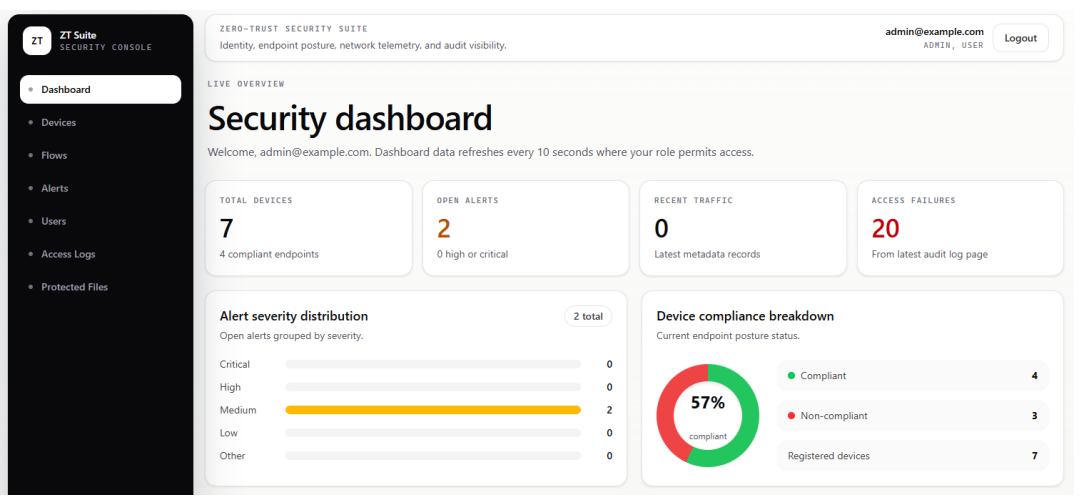 Security dashboard overview displaying active devices, alert distribution, and overall compliance posture.